










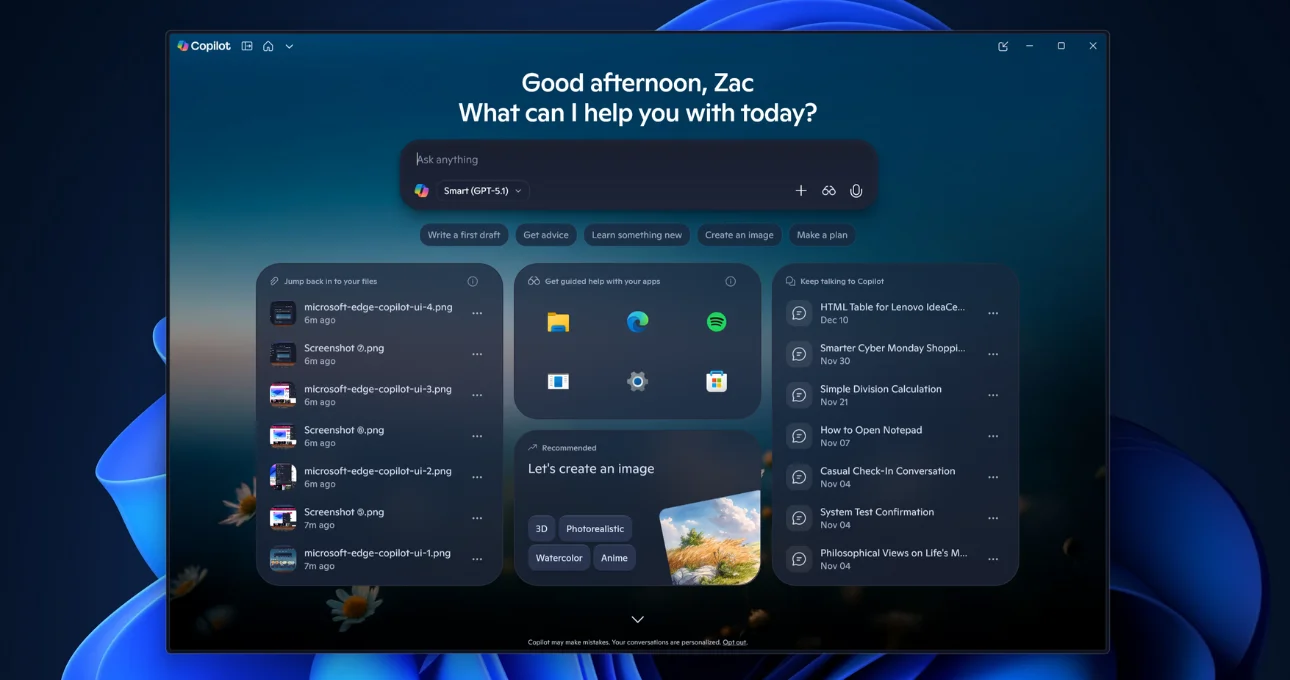
Microsoft is quietly reshaping the future of web browsing. According to reports, the company is testing a Copilot-inspired redesign for Microsoft Edge, bringing the visual language and interaction patterns of Copilot directly into the browser interface. While the update may appear cosmetic at first glance, it signals a deeper strategic shift: Microsoft is positioning Edge as an AI-native browser, not just a gateway to the internet.
The redesign introduces Copilot’s clean, conversational aesthetic into Edge’s menus, settings, and navigation layers. Rounded elements, simplified layouts, and contextual prompts hint at a browsing experience where AI assistance is always within reach. Rather than treating Copilot as an add-on or sidebar feature, Microsoft appears to be weaving AI into the core of how users interact with the browser.
From Tool to Companion
Traditionally, browsers have been passive tools—displaying web pages and managing tabs. Microsoft’s approach suggests a move toward a more proactive model. By aligning Edge’s interface with Copilot, the browser becomes a companion that can help users summarize content, compare information, draft text, and make decisions in real time.
This shift reflects a broader trend across Microsoft’s ecosystem. Copilot is already embedded across Windows, Microsoft 365, and developer tools. Extending the same design language and interaction model into Edge creates a consistent AI experience across products, reducing friction for users who rely on Copilot daily.
Why Browsers Are the Next AI Battleground
The browser is one of the most frequently used applications on any device, making it a prime surface for AI integration. By redesigning Edge around Copilot, Microsoft is signaling that future browsers will do more than load pages—they will interpret, organize, and act on information.
Imagine searching for complex topics and receiving instant summaries, comparisons, or action items without leaving the page. Or adjusting settings and preferences through conversational prompts instead of navigating deep menus. These are the kinds of experiences Microsoft is hinting at with its Copilot-inspired redesign.
Beyond Aesthetic Changes
While the visual update is notable, the deeper impact lies in how AI could reshape browser workflows. Integrating Copilot into settings and navigation suggests that AI may eventually help users optimize privacy, manage extensions, or configure performance based on usage patterns.
For enterprise users, this could translate into smarter research workflows, faster document creation, and more efficient multitasking. For everyday users, it could mean less cognitive load and more intuitive browsing.
Part of a Larger Copilot Expansion
The Edge redesign also reinforces Microsoft’s long-term bet on Copilot as a unifying interface across its product portfolio. Rather than building separate AI features for each application, Microsoft is standardizing on Copilot as the front door to intelligent assistance.
This approach mirrors the evolution of operating systems and productivity suites, where consistent design and behavior drive adoption. By making Copilot feel native everywhere—from desktop to browser—Microsoft increases its chances of shaping how users expect AI to behave.
Competitive Implications
The move puts pressure on other browser makers to rethink their own AI strategies. As AI-powered search and assistants become more common, browsers that fail to evolve risk feeling outdated. Microsoft’s Edge redesign suggests that the browser itself may become a central hub for AI interaction, not just a window to web-based tools.
A Glimpse Into the AI-First Web
Microsoft’s Copilot-inspired Edge redesign offers a glimpse into what an AI-first web experience could look like. It’s a step toward browsers that understand intent, reduce friction, and actively assist users as they navigate the internet.
While the redesign is still in testing, the direction is clear. Microsoft isn’t just updating Edge’s look—it’s redefining what a browser is meant to be in the age of AI.